
Football League 2026 logo

Football League 2026 Offline Mode Guide: Playing Without Internet

What works offline in Football League 2026: career and exhibition play without a connection, what needs internet, and how progress behaves between modes.

Rated 4.5/5 · 31k

Not every match happens on a good connection. Flights, rural journeys, data saving evenings and simple peace and quiet all make offline play a real part of how a mobile football game is actually used, and it deserves a guide of its own.

This page explains the offline side of Football League 2026 honestly: which modes are built for disconnected play, which features expect a connection, and how to prepare the game before you leave coverage so nothing important surprises you mid journey.

The full mode list and game overview live in the Football League 2026 modes and download guide. Use this guide to plan the disconnected hours, which for many players are the hours they play most.
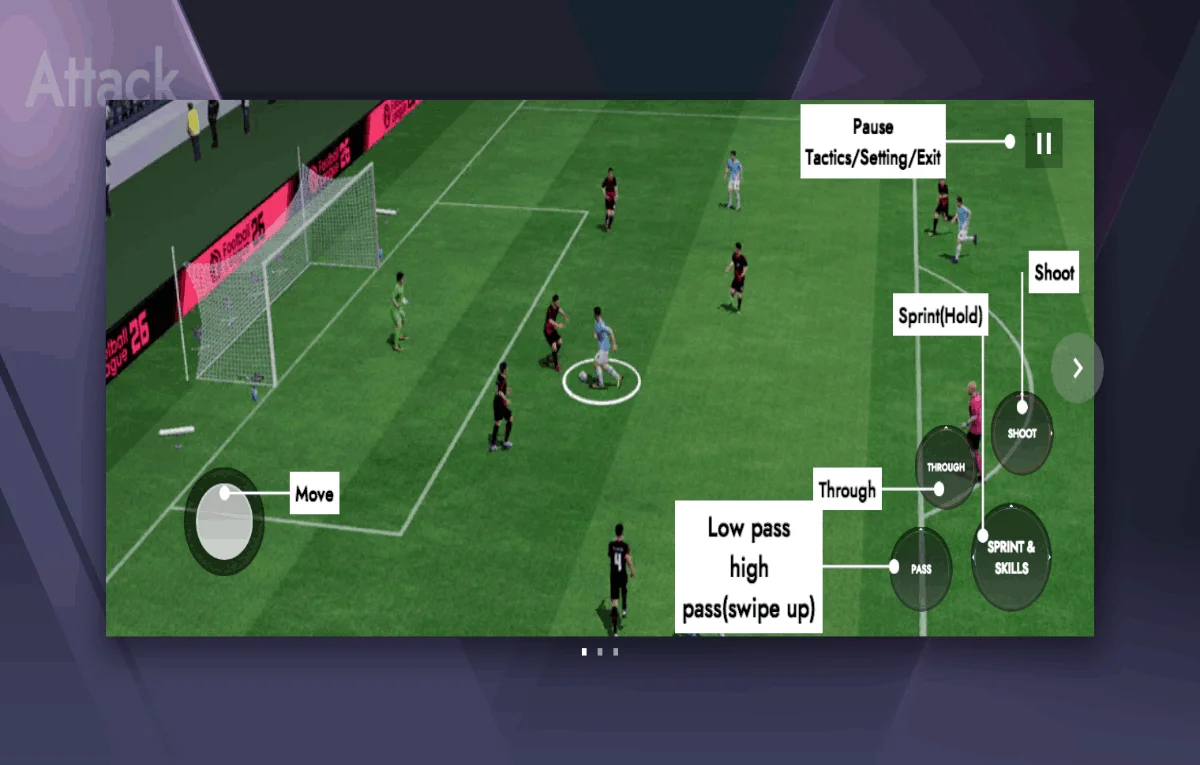

What Offline Play Is Designed For

Career and exhibition football are the natural offline home: full matches against the game's intelligence, squad management, training decisions and season progression, none of which need another human at the other end of a network.

That is a substantial game, not a demo. A career season played entirely offline contains the same decisions, transfers and development arcs as any other, and many players prefer it for exactly the focus it creates.

Prepare by opening the game once on a connection before travelling, letting any pending updates or resource downloads complete. A game surprised by disconnection mid download is the most common offline problem, and it is entirely preventable.

What Needs a Connection

Anything involving other players, live events or shared content needs the internet by definition: online matches, event leaderboards and time limited competitions cannot be simulated locally, and the game will say so when you try.

Account level features can also expect a connection: cloud saves syncing, purchases verifying and some reward systems checking in. The practical rule is simple: if a feature involves anyone or anything outside your phone, it needs the network.

Football League 2026 career mode guide and Football League 2026 multiplayer guide explains the online side in full. Reading both guides together gives you the honest border between the two halves of the game, which is the only thing an offline player truly needs to know. This is also where Football League 2026 rewards patience most clearly, because the benefits compound quietly across a whole season.

Football games are won in the spaces between the obvious moments: the midfielder's first touch that turns pressure into a pass, the full back's starting position that kills a counter before it breathes, the striker's curved run that drags a centre back two metres from where the cross will land. Training your eyes for those moments is the deepest skill any of these guides can offer, because the obvious moments take care of themselves.

Difficulty and Honest Challenge Offline

Offline opponents are only as good as the difficulty you choose, and the most common offline complaint, that the game feels too easy or brutally hard, is usually a difficulty setting one step from where it belongs.

Raise difficulty when you win most matches by two goals; lower it when every match is survival. The right setting produces a mix of wins, draws and defeats that feels like football, and it usually sits one step above the level that flatters you.

Vary your own play as the season develops. The game's intelligence adapts to repeated patterns within its limits, and a player who attacks identically every match teaches it exactly how to stop him. A careful Football League 2026 player always starts from that baseline, so a change can be credited to the decision that actually caused it.

Progress, Saves and Switching Devices

Offline progress is saved on the device as you play, in the ordinary way. The risk is not disconnection; it is the device itself. A lost or reset phone takes unsynced progress with it, which is the strongest argument for syncing whenever a connection is available.

Make a habit of opening the game on Wi-Fi at home after any long offline stretch, letting saves sync before you play on. That one habit quietly insures weeks of career progress for the price of a minute's patience.

If you change devices, sync first on the old one and confirm the career appears on the new one before wiping anything. Football League 2026 career mode guide and Football League 2026 multiplayer guide for career mode covers where your season lives inside the game's systems. The same discipline applies across Football League 2026: change one thing, watch honestly, and write down what the match actually said.

Fitness is a tactical weapon disguised as a physical one. A team that can press in the eightieth minute owns choices that a tired team simply does not have, and every training and substitution decision in a season is quietly a decision about which choices will exist when the match is decided.

Battery and Data Habits for Travel Play

Offline football is kind to data by definition and harder on battery than most phone tasks, because the screen, processor and sound work continuously. A full match day of travel play wants a power bank the way a striker wants service.

Lower screen brightness and close the heavy background apps before a long session. The game will run cooler and longer, and a phone that survives the journey is worth more than the brightest possible first half.

Download nothing at the last minute on airport or station Wi-Fi if you can avoid it. Prepare at home, where the connection is yours, the time is calm, and the game can verify everything it needs before you are a passenger. Players who approach Football League 2026 as a long campaign tend to build these habits early, and their squads show it by spring.

Making Offline a Feature, Not a Fallback

Treat offline sessions as the laboratory of your game: new formations, development minutes for prospects, set piece routines rehearsed without league pressure. The laboratory works because nothing online is at stake in it.

Keep a small list of experiments for travel time. A two hour journey with a plan produces a better first team than a week of autopilot matches, and the experiments are half the fun of a long career anyway.

Offline play is not the game with something missing. For career players especially, it is the game at its most focused, and the players who embrace it build the deepest squads in the community. None of this requires perfect Football League 2026 play; it requires decisions you can explain, repeated until they become instincts.

Young players improve in visible lumps and invisible plateaus, and the plateau is usually where the next lump is being loaded. A manager who understands that rhythm holds his nerve through the flat months, and his squad inherits the benefit when several lumps arrive together in spring.

Frequently Asked Questions

Yes. Career and exhibition play are designed for disconnected use, with full matches, transfers and development. Prepare by letting updates and resources finish downloading while you still have a connection.

Online matches, live events, leaderboards and account syncing need a connection. Anything involving other players or shared content cannot run offline.

Progress saves on the device and syncs when a connection returns. Sync regularly at home to insure a long career against losing or resetting the phone itself.

Move the difficulty one step toward the results you are getting: up if you win comfortably most weeks, down if every match is survival. The right level yields a realistic mix of results.

Conclusion

Offline mode is a complete way to play: career depth, honest challenge and your own laboratory for tactics and prospects, needing only a prepared download and a charged battery.

Prepare before you travel, sync when you return, and let the disconnected hours do the deep work of your season. Many of the best squads in this game were built at thirty thousand feet.

Marco Rossi

Reviewed by

Marco Rossi

Football Games Reviewer

Marco tests football games on real Android devices, playing full matches and career weeks to check controls, tactics and performance before any game is listed here.

More about Marco Rossi